https://mswalker.cettiworks.net
Login:
Username: [first initial][lastname]@mswalker.com
Password: CettiWorks-1
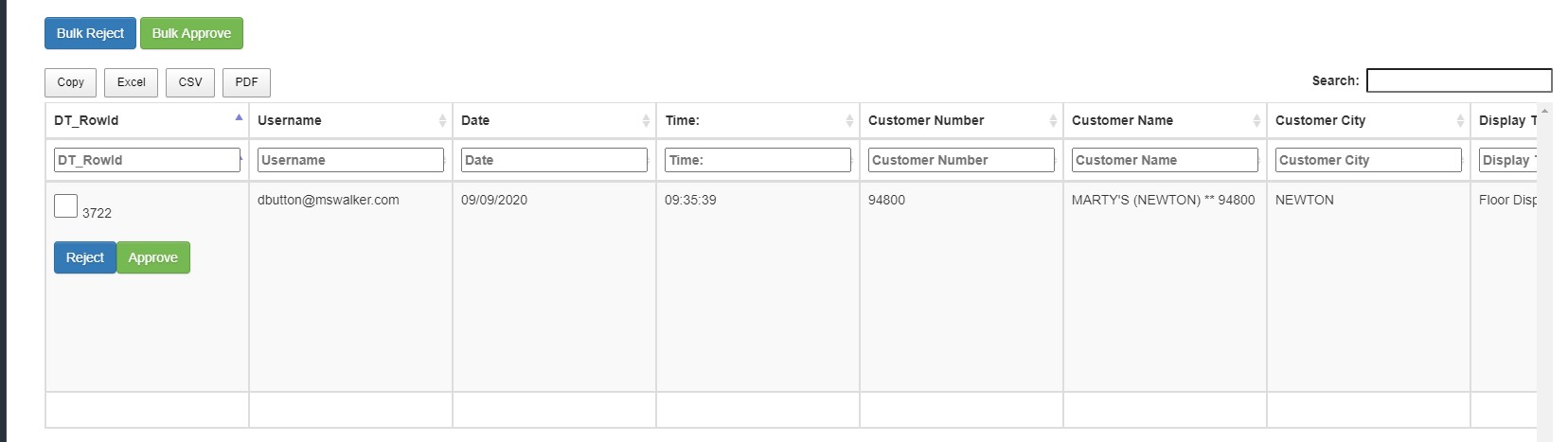
- Approve button in the DT_RowId column
- Has notification window to Prompt user “Are you sure you want to approve?”, with a Yes or No prompt.
- If Yes is clicked, then continue with rest of functions.
- If No is click do nothing.
- Sets Status field to “Approved”
- Adds text to Notes field “Approved by: (username of approver)
- Reject button in the DT_RowId column
- Has notification window to Prompt user “Are you sure you want to reject?”, with a Yes or No prompt.
- If Yes is clicked, then continue with rest of functions.
- If No is click do nothing.
- Sets Status field to “Reject”
- Prompts Rejection reason window
- Users types reason for rejection
- Email is sent to user with submission information and reason for rejection.
- Bulk Reject and Bulk Approve apply same functions as the Approve and Reject buttons to all rows that have the check box selected.
- Once the status is changed to Approved or Rejected the entries will filter out of the managers’ view
0 Comments